A confession we make to most clients in the first hour: most prompt engineering you read about is informed guessing dressed up as expertise. Somebody tweaks a system prompt, the output gets a little better on one example, they commit it, and three weeks later the same prompt is producing a different category of failures. There is no dataset. There is no metric. There is no way to know whether the last change helped or hurt.
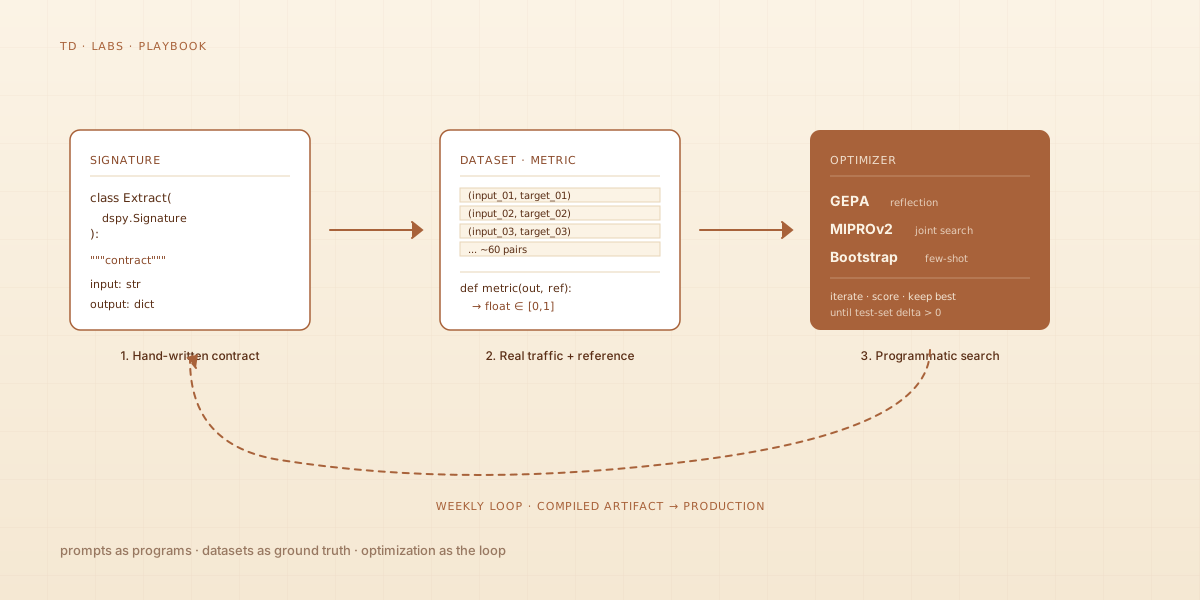
This post is about the alternative — treating prompts the way we already treat dbt models, semantic layers, and CI pipelines: as production code with inputs, outputs, tests, versioning, and an optimization loop you can actually defend in a Monday standup. The tool we reach for is DSPy, and the workflow has three moving parts: a signature, a dataset, and an optimizer. Each one is straightforward. The discipline is in running the loop weekly, not annually.
The unstated cost of vibes-based prompting
If your prompt lives in a Python f-string and the only feedback signal is “the answer looked right that one time I checked”, you are paying for the absence of a system in three ways. None of them show up on a balance sheet, all of them eat margin.
Brittleness. A small change upstream — a new field in the input record, a slight shift in the LLM provider’s tokenizer, a customer who asks the same question in a different register — silently degrades quality. Because there is no metric and no held-out set, you find out from a support ticket, not a dashboard.
Reproducibility gap. When the prompt does work, you cannot say why it works. You cannot port the same prompt to a different model and predict whether it will hold. You cannot hand the prompt to a new engineer and have them improve it without re-discovering everything you discovered.
The optimization ceiling. You can hand-tune for hours and squeeze out a percentage point or two, but you cannot systematically search the space of plausible phrasings, instruction orderings, and few-shot example sets. A reasonable optimizer can do in twenty minutes what a human cannot do in a week, and the gap widens as the task complexity grows.
The argument for DSPy is not that handwritten prompts are bad. The argument is that handwriting is the wrong tool for the part of the problem that is mechanically searchable.
A different framing: prompts as programs
DSPy reframes a prompt as a program with three abstractions worth memorizing.
A Signature is the contract — what goes in, what comes out, what the relationship between them is. It is not a prompt. It is a typed description that DSPy uses to generate a prompt later, after it knows your model, your dataset, and your metric.
import dspy

class ExtractActionItems(dspy.Signature):
    """Extract action items, owners, and due dates from a meeting transcript."""
    transcript: str = dspy.InputField()
    actions: list[dict] = dspy.OutputField(
        desc="JSON list of {action, owner, due_date} objects. due_date as ISO 8601 or null."
    )
Notice what is not in there: no system prompt, no few-shot examples, no instructions about formatting, no jailbreak guards. Those are emergent properties of the optimization run, not author-time decisions.
A Module wires signatures into runnable units. The basic ones — Predict, ChainOfThought, ReAct — implement different reasoning patterns over the same signature. You compose them like normal Python objects:
class MeetingProcessor(dspy.Module):
    def __init__(self):
        super().__init__()
        self.classify = dspy.Predict(ClassifyMeetingType)
        self.extract  = dspy.ChainOfThought(ExtractActionItems)
        self.review   = dspy.Predict(ReviewExtraction)

    def forward(self, transcript: str):
        meeting_type = self.classify(transcript=transcript).meeting_type
        actions      = self.extract(transcript=transcript).actions
        reviewed     = self.review(actions=actions).filtered_actions
        return dspy.Prediction(meeting_type=meeting_type, actions=reviewed)
This is a three-stage pipeline. None of the stages contain a literal prompt string yet. The prompts come from optimization.
An Optimizer takes a module, a dataset of (input, expected_output) pairs, and a metric function, and produces a compiled module — a version of your module with prompts that perform measurably better than the uncompiled baseline. The compiled module is what you ship.
The dataset is the part everyone skips
Optimization is impossible without a dataset, and constructing one is the single largest source of friction in adopting DSPy at any client we have worked with. People want to skip it. Do not skip it.
A useful prompt dataset has three properties:
- Real inputs. Not synthetic, not “what we think users might ask”. Pull from production logs, customer support tickets, or recorded sessions. Anonymize as needed, but preserve the actual phrasing, length, and weirdness of real traffic.
- Reference outputs that are at least one person’s considered answer. Not “correct” in some absolute sense — there often is no absolute answer for the outputs we want LLMs to produce — but representing what a careful human would write if they had time. The reference output is the target the optimizer aims for.
- A held-out test split that the optimizer never sees. Splitting ~70/15/15 (train / dev / test) is conventional. The test set is the only honest signal you have about whether optimization actually generalizes.
How big? Smaller than you think. 30 to 100 examples is enough for most production tasks to see significant improvement from optimization. The marginal value of the 200th example is tiny if the first 100 cover the failure modes. Spend the time on quality, not volume.
Where do the reference outputs come from when you do not have ground truth? You write them yourself, in pairs, the first time. We allocate a Tuesday afternoon for it. It is unpleasant work and it cannot be avoided. Sixty examples × five minutes per example = five focused hours. That is the entire dataset construction cost.
Signal patterns: the underrated half of the work
Most prompt-engineering literature treats the input as monolithic — “the user query goes in, the answer comes out.” In practice, real inputs carry signal patterns that should route to different handling branches, and detecting those signals is often more valuable than refining the main prompt.
A live example from our own consulting work: customer-support traffic for one engagement carried emotion markers — exclamation runs (!!, !!!), interrobang clusters (??!!, ?!?!), all-caps phrases — and the rate of escalation requests was substantially higher for inputs containing those markers than for inputs without them. The unoptimized agent was treating an angry customer’s “WHERE IS MY ORDER???” identically to a calm “Could you check on my order, please?” The model produced perfectly polite responses to both, which read as tone-deaf to the angry customer and as professional to the calm one.
The fix was not better prompting. The fix was a two-stage pipeline: a cheap signal-detection pass that classified inputs into routine, urgent, or escalating based on punctuation density, all-caps ratio, escalation phrases (“legal action”, “speaking to a manager”, “third time I’ve asked”), and conversational history; and a routing layer that sent each class to a differently-optimized handler module.
class SignalDetector(dspy.Signature):
    """Classify the urgency signal in a customer message."""
    message: str = dspy.InputField()
    history: list[str] = dspy.InputField(desc="Last 3 messages from this user.")
    signal: str = dspy.OutputField(desc="One of: routine, urgent, escalating")
    confidence: float = dspy.OutputField(desc="0.0 to 1.0")

class Router(dspy.Module):
    def __init__(self):
        super().__init__()
        self.detect    = dspy.Predict(SignalDetector)
        self.routine   = dspy.ChainOfThought(RoutineHandler)
        self.urgent    = dspy.ChainOfThought(UrgentHandler)
        self.escalate  = dspy.Predict(EscalationHandler)

    def forward(self, message, history):
        s = self.detect(message=message, history=history)
        if s.signal == "escalating":
            return self.escalate(message=message, history=history)
        if s.signal == "urgent":
            return self.urgent(message=message, history=history)
        return self.routine(message=message, history=history)
Each handler gets optimized against the slice of the dataset that carries its signal. The escalation handler learns to acknowledge frustration first, name the failure mode, and propose a concrete remediation step. The routine handler learns to be efficient and not over-apologize. Both improve more than a single unified prompt could, because the dataset for each is narrower and more consistent.
The general pattern: look for signals in the input that should change behavior, detect them cheaply, and route to specialized modules. This is the single most underrated technique in production prompt engineering.
The optimizer landscape
Three optimizers are wired into DSPy. Pick by task shape, not by reputation.
| Optimizer | What it does | Best for | Cost |
|---|---|---|---|
| GEPA | Reflection-based — uses a “teacher” LM to critique outputs, then rewrites instructions and few-shot examples to address the critique | Multi-step reasoning modules, complex signatures, tasks where the failure modes vary | High (each iteration calls the teacher LM) |
| MIPROv2 | Joint optimization of instructions + few-shot examples via Bayesian search | Tasks where you need both instruction tuning and example selection, moderate dataset size | Medium |
| BootstrapFewShot | Fast bootstrapping: runs the uncompiled module on training inputs, keeps the runs that pass the metric, uses them as few-shot examples | Quick baseline, small datasets, when you mostly need few-shot rather than instruction tuning | Low |
The decision tree we use in practice:
- Less than 30 training examples and you need a baseline today: BootstrapFewShot.
- Moderate dataset, clear metric, want both instructions and examples optimized: MIPROv2.
- Multi-step reasoning module where you need the optimizer to understand failure-mode patterns: GEPA.
GEPA is the default we reach for on harder tasks because the reflection trace is genuinely useful for debugging — the teacher LM tells you why the current prompt is failing, which gives you a starting point even when optimization plateaus. The cost is real, though: a GEPA run on a 60-example dataset over five optimization rounds is roughly a thousand teacher-LM calls. Plan accordingly.
The blended workflow, handwritten and ML-generated
People sometimes hear “DSPy optimizes prompts” and conclude that human input is no longer needed. Wrong. The blend that works in practice:
- Write the signature by hand. This is your design decision: what fields, what types, what the docstring says about the task. The signature is a contract you commit to.
- Write a small handwritten prompt as the baseline. Twenty minutes of work. This becomes the floor that the optimizer must beat to justify itself.
- Define your metric. This is the hardest part. A metric is a function that takes a model output and a reference output and returns a score (0.0–1.0, or pass/fail). For some tasks an exact-match check works. For others you need a structured comparison (does the JSON have the right keys? do the action items overlap with the reference?). For genuinely subjective tasks you may need an LM-as-judge metric, but use that as a last resort — it adds another layer of model variance you have to debug.
- Run the optimizer. Start small (30 examples, 3 rounds) to validate the wiring. Then scale up.
- Compare on the held-out test set. Be paranoid here. If the compiled module looks dramatically better than the baseline on test, it is more likely that your metric is leaking signal than that you have discovered a miracle. Sanity-check by hand on a few examples.
- Ship the compiled artifact, not the optimizer. Production runs the compiled module. The optimizer runs offline, on a schedule, against accumulated production traffic.
That last point matters. DSPy’s compile artifact — the serialized state of an optimized module — is what gets versioned, reviewed, and deployed. It is a small JSON-ish thing that you can diff. Treat it the way you treat a trained model checkpoint, because that is what it is.
Iteration in practice
The cadence we run for clients with serious LLM workloads is weekly. Every Friday afternoon, the optimizer runs against the previous week’s production logs (deduplicated, anonymized, sampled), produces a new compile artifact, and writes the test-set delta to a slack channel. If the delta is positive and a quick human spot-check passes, the artifact is promoted to staging on Monday and to production by Wednesday.
This is the same cadence a serious data team runs for dbt model rebuilds. The infrastructure is similar: a CI runner with GPU access (or a managed inference API budget), a feature branch for the optimizer state, an automated test pass, and an approval step.
What this changes about the product: instead of an LLM feature that ships once and degrades, you get one that improves at a measurable rate. We have engagements where the compiled prompt’s test-set score has moved from 0.62 to 0.84 over twelve weekly optimization cycles, against a baseline that would have stayed at 0.62 forever if no one had touched it.
When NOT to do this
DSPy is not free, and the overhead is wasted on a meaningful fraction of LLM use cases.
Skip it when:
- The prompt changes infrequently and the task is narrowly scoped (e.g., a one-shot summary of a fixed-format document). The cost of building the dataset and the optimizer pipeline exceeds the benefit.
- The output is single-turn factual Q&A with a clear right answer that the base model already gets right.
- You are running a one-off script for a single project, not a production feature.
- The model behind the prompt costs cents per call and the failure mode is “the user retries and it works the second time.” Optimization economics do not pencil.
Adopt it when:
- The prompt is exercised at scale (hundreds of inputs per day or more).
- The cost of a bad output is meaningful (a customer escalation, a missed action item, a compliance flag).
- You have or can build a real dataset from real traffic.
- You can define a metric you trust.
The cost-benefit pivot, roughly: when the daily cost of bad outputs exceeds the weekly cost of running the optimization loop, DSPy starts paying for itself. For most production LLM features at our client base, that threshold is reached within the first month.
The bigger pattern
The deepest lesson from running this loop for a few years is not technical. It is that the discipline of treating prompts as production code is what separates an AI feature from an AI product.
An AI feature ships a prompt and hopes. An AI product has:
- A dataset that grows with production traffic.
- A metric that ties model output to business outcome.
- An optimization loop that runs on a schedule.
- A versioned compile artifact that flows through CI.
- An observable failure surface — drift dashboards, escalation rates, output-distribution monitoring.
- A human-in-the-loop pathway for the failures that drift catches.
DSPy is a vehicle for that discipline. So are equivalent ideas in other ecosystems — LangSmith evals, Prompt-Flow, Anyscale’s evaluation harnesses. The toolchain matters less than the loop.
If your LLM features are stuck at “we wrote a prompt and it seemed to work” — and you are starting to feel the cost of that — DSPy is the lowest-friction way to climb out. Start with one feature, one dataset, one optimizer pass. Run the loop for a month. Measure the delta. The shape of the improvement curve will tell you whether it is worth scaling to the rest of your LLM surface.
What to do this week
A minimal first-time loop you can run in an afternoon:
- Pick one LLM feature in your stack. Ideally the one you are most worried about, but if everything is on fire, pick the simplest.
- Pull 50 real examples from production. Anonymize. Save as JSONL.
- Hand-write reference outputs for 30 of them. Hold the other 20 as a test set.
- Define a signature for the task. Just the contract — fields, types, docstring.
- Write a 20-minute handwritten prompt as your baseline. Score it against the test set.
- Run BootstrapFewShot on the 30-example training set. Score the compiled module against the same test set.
- Compare. If the compiled module wins by more than noise, you have your answer: this approach generalizes for this task. Scale up.
The whole thing fits in an afternoon. The output is a number — the test-set delta — that tells you whether to invest further. That number is more honest than any vibes-based prompt review will ever be.
That is the entire pitch. Stop hand-tuning. Build the dataset. Run the optimizer. Ship the artifact. Measure. Repeat.
If you want help wiring this into a stack you already operate — particularly if the dataset construction step feels like the bottleneck — the first hour is free. We will scope what is recoverable from your existing prompt history and what needs to be built from scratch, and you walk out with a concrete first-week plan.
––